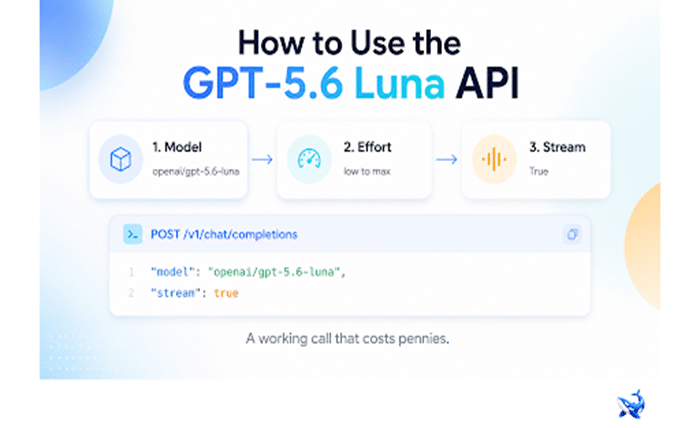
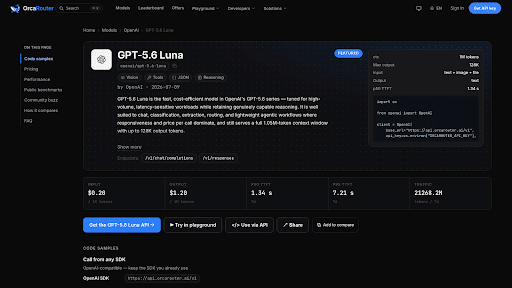
The GPT-5.6 Luna API is OpenAI’s economy-tier reasoning model, and after the price cut it is the cheapest serious reasoning endpoint on the board: $0.20 per million input tokens and $1.20 per million output tokens, roughly 80% below the $1/$6 launch price, with that cut passed through at 0% markup on the endpoint used below. GPT-5.6 Luna carries the live rate card and ready-to-run code samples; this piece is the hands-on part — a working first call, the one parameter that changes your bill, and what latency actually looks like in production.
The integration itself is two lines of configuration. GPT-5.6 Luna speaks the OpenAI chat-completions dialect, JSON in and JSON out, so any client that already talks to an OpenAI-compatible endpoint works unchanged. It is available from OpenAI’s own API and from several third-party platforms that route to it; the examples below use OrcaRouter’s endpoint, which carries the model as openai/gpt-5.6-luna behind the same key as 200-plus other models.
The first call, start to finish
Python, with the standard OpenAI SDK:
“`python
from openai import OpenAI
client = OpenAI(
base_url=”https://api.orcarouter.ai/v1″,
api_key=”YOUR_ORCAROUTER_KEY”,
)
resp = client.chat.completions.create(
model=”openai/gpt-5.6-luna”,
messages=[
{“role”: “user”, “content”: “Summarize this changelog in two bullets.”},
],
)
print(resp.choices[0].message.content)
“`
That is the entire integration. The endpoint is OpenAI-SDK compatible, the request and response are plain JSON, and the only two things that differ from a call to any other model on the same client are the base URL and the model string.
GPT-5.6 Luna carries a context window of 1,000,000 tokens per Artificial Analysis, and accepts text plus image input with text output — so a large repository or a long document genuinely fits in a single request. This is the model you reach for when the context matters as much as the reasoning.
The reasoning-effort parameter
Like the rest of the GPT-5.6 family, Luna always reasons — you cannot turn it off — but you choose how hard, on a dial that runs from low up to max. That setting is the most consequential one in the whole integration, for two reasons.
First, reasoning tokens bill as output. At $1.20 per million output tokens, a model that deliberates longer is a model that costs more to think. Second, every published benchmark is the maximum configuration: Artificial Analysis records GPT-5.6 Luna at an Intelligence Index of 52.32 in its max setting, well above the tier median of 17, while the same run at xhigh scores 50.06 and high lands at 46.96. If you deploy on a lower setting and compare your results against a published number, you are not measuring the same thing.
| Reasoning effort | Intelligence Index (Artificial Analysis) | Verdict |
| max | 52.32 | the config every published benchmark uses |
| xhigh | 50.06 | near-max quality for less deliberation |
| high | 46.96 | fine for routine reasoning work |
A workable starting policy: max or xhigh for hard, one-off analysis; high for interactive development; low for classification, extraction and routing, where the answer is not a reasoning problem. Measure the quality difference on your own tasks before assuming the higher setting earns its extra output tokens.
The price math
Luna’s post-cut price is the headline: $0.20 per million input tokens and $1.20 per million output, an ~80% cut from the $1/$6 launch price. The cut is real and passed through — OrcaRouter’s catalog and Artificial Analysis both read the same $0.20/$1.20. For scale, the family sits at Sol $5/$30, Terra $2/$12 (itself cut ~20% from $2.50/$15), and Luna at $0.20/$1.20. A few outside listings quote a different split; our reference is the post-cut price as passed through at 0% markup.
Independent economics confirm the story. Artificial Analysis prices a full Intelligence Index task for Luna at $0.05 — the cheapest on its board, against $2.34 for Claude Opus 5 and $1.23 for GPT-5.6 Sol — and evaluates the complete index for $172.17 across 130 million output tokens, against a tier median of 60 million. This is a volume model; at these prices it competes with cheap fast models rather than with flagships.
Latency reality: what the telemetry says
Two numbers describe the same model. Artificial Analysis measures roughly 102 ms time-to-first-token and a median output speed of 156.6 tokens per second, which it flags as notably fast and among the quickest on its board. OrcaRouter’s own seven-day production telemetry tells a more conservative story: a p50 time-to-first-token of 1.33 seconds and a p95 of 7.32 seconds. Both are true. The independent figure is a controlled single-request test; the production figure includes routing, cold starts and real load — and Luna carries a lot of load. On OrcaRouter it moved 21,271.6 million tokens in the last seven-day window, by far the highest-volume model in the telemetry set.
The practical rule: budget for the p95, not the p50. A 1.33-second first token is fine for batch jobs, agent loops and background summarization; it is the wrong shape for latency-critical autocomplete, where you want the controlled-sounding 102 ms figure — and even then only if your connection profile actually delivers it. Streaming hides most of the gap for human-facing chat.
Streaming
For anything a human is waiting on, stream. The call is identical except for stream=True, and the SDK yields tokens as they arrive rather than after the full response:
“`python
stream = client.chat.completions.create(
model=”openai/gpt-5.6-luna”,
messages=[{“role”: “user”, “content”: “Draft a commit message for the diff below.”}],
stream=True,
)
for chunk in stream:
delta = chunk.choices[0].delta.content
if delta:
print(delta, end=””, flush=True)
“`
One parameter, same JSON contract. That is the whole integration; the production concerns are where the real differences live.
Production notes: timeouts, retries, volume workloads
Three habits matter on a volume workhorse.
Timeouts. Luna is fast but not uniform. Set a connection timeout that survives the p95 — a first token at 7.32 seconds is a long wait, and a client that times out at 3 seconds will retry a request that was about to succeed. A read timeout above the p95, with streaming as the liveness signal, is the sane shape.
Retries. Distinguish retryable from not. 429s and 5xx are retryable with exponential backoff and jitter; a 400 is a bug, and retrying it just bills you. Idempotent read-style prompts retry safely; anything with side effects needs a dedupe key of your own.
Volume. This is the model you pick when the workload is large and the budget is real. At $0.20/$1.20 the cost floor is low enough that even heavy pipelines stay economical, and routing through a platform with automatic failover means a bad afternoon on an upstream cluster does not take your batch down with it. One key, 0% markup, automatic failover across providers — the model sits behind the same interface you would use for anything else on the account.
The takeaway
GPT-5.6 Luna answers a specific question: do you need real reasoning at a volume price? If yes, the API costs almost nothing to try — a working call is the snippet above, the effort dial is the only setting you must set deliberately, and the 1M context window fits work the cheap fast models cannot. If your task is genuinely latency-critical, or you need the strongest possible reasoning, benchmark the flagship tier instead and let the numbers decide.
Try it with one key, on a workload with room for a seven-second worst case, and design around the p95 rather than the p50. At these prices, the experiment costs pennies.
Sourcing note: pricing, the post-cut family rates and the 0% markup pass-through are OrcaRouter’s catalog figures as of August 22, 2026. The context window, Intelligence Index, output speed, time-to-first-token and cost-per-task figures are Artificial Analysis’ independent measurements checked on the same date. p50/p95 time-to-first-token and seven-day token volume are OrcaRouter’s own production telemetry. One outside listing differs on the price split; our reference is the post-cut price passed through at 0% markup.